Your Codex limit. In sight, before it stops you.
See how much of your Codex allowance is left and when it resets (5-hour, weekly or monthly, depending on your plan), on your Mac or Windows screen.
- Claude
- ChatGPT
- Grok
- Cursor
- Perplexity
- + more
Mac & Windows
Mac: Apple Silicon (M1 or later), macOS 13+. Windows 10/11.
Our tools are used by 20,000+ users.
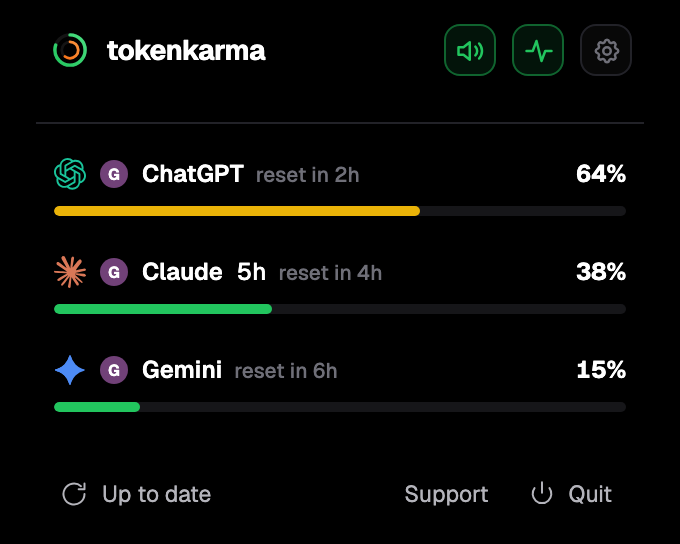
Your accounts. Your limits. Right on your desktop.
How Codex usage limits work
Codex is included in every ChatGPT plan, and it does not have a fixed message count. OpenAI gives each plan an allowance, and every task uses part of it. How much depends on the model, the size of the task, the reasoning effort, the speed you pick, and whether it runs locally or in the cloud. Cloud tasks use more than local ones.
On Plus and Business Standard seats there are two allowances at once: one for each 5-hour period and one for the week. The same usage counts against both, and the two can reset at different times. On Pro and Business Premium seats there is no 5-hour limit, only the weekly allowance.
Codex shares this allowance with ChatGPT Work, ChatGPT for Excel and Workspace Agents. Starting a new chat does not reset it.
Codex limits by ChatGPT plan
| Plan | 5-hour limit | Weekly limit | Cloud tasks |
|---|---|---|---|
| Free | Not published | Not published | No |
| Go | Monthly allowance instead | Monthly allowance instead | No |
| Plus | Yes | Yes | Yes |
| Pro (all tiers) | None | Yes | Yes |
| Business Standard | Yes | Yes | Yes |
| Business Premium | None | Yes | Yes |
| Enterprise / Edu, flexible pricing | No fixed limit, usage draws on credits | No fixed limit | If the workspace enables it |
OpenAI does not publish the weekly amounts. For Plus and Business Standard it gives estimates per 5-hour period, which vary a lot by model: on Plus, for example, 15 to 160 local messages with GPT-6.1 Sol and 350 to 3,000 with GPT-6 Luna. OpenAI says these are estimates, not fixed limits. Pro 200 includes more than Pro 100, and Pro 500 the most.
Your Codex limits on your screen, with their reset times.
tokenkarma shows where you stand and when each limit resets, while you work.
Three steps: sign in, get the app for your Mac or Windows computer, then add the extension from the app.
When Codex limits reset
The 5-hour period and the weekly period each run on their own clock, so they can reset at different times. OpenAI does not publish a fixed weekly reset day or time. After a paid reset, the new week starts with your first Codex request, and the next automatic reset comes 7 days later. Until a new period starts, the reset time Codex shows can be an estimate and can move.
Besides the normal resets, there are three one-time kinds:
- Banked resets, which OpenAI gives from time to time or for some referrals. You choose when to use one, before it expires, and only once an allowance it covers is below 80 % left. Using it refills the 5-hour and weekly allowances and moves your weekly reset date.
- Automatic resets, applied by OpenAI to selected accounts. Nothing to redeem.
- Paid instant resets, offered to some Plus and Pro accounts. It brings your weekly allowance forward; it does not add extra usage.
None of the free resets has a guaranteed schedule.
What happens when you hit the limit
The task you are in can finish. After that you can wait for the reset time shown, use a banked reset if you have one, buy credits (Plus and Pro) or workspace credits (Business, Enterprise, Edu), upgrade, or run local chats with an API key at API prices.
How to see your remaining Codex usage
In Codex, the usage page in Settings shows what is left and the reset times, and /status shows it during a Codex CLI session. tokenkarma keeps your Codex allowance (5-hour, weekly or monthly, depending on your plan) on your Mac or Windows screen, next to your other AI tools, with an alert before you hit a limit, so you don't have to open settings to check. On paid tokenkarma plans you also get an alert when a limit is back.
What changes in December
OpenAI has announced that from December, Plus, Pro and Business plans will share one allowance across ChatGPT and Codex, measured in tokens, with the remaining usage and reset times shown in Settings. OpenAI has not given an exact date. We will update this page when it starts.
Frequently asked questions
How often does Codex reset?
On Plus and Business Standard, there is a 5-hour allowance and a weekly one, each with its own reset time. On Pro and Business Premium, only the weekly allowance resets. Go has a monthly allowance.
What time is the Codex weekly reset?
OpenAI does not publish a fixed time, and it can differ from one account to another. The usage page in Codex settings shows your next reset time.
Is Codex free with ChatGPT Go?
Codex is included in Free and Go, in the desktop app, for lighter tasks. Cloud tasks are not included on Free or Go.
Is Codex unlimited?
Not on Free, Go, Plus, Pro or Business: each has an allowance. Only Enterprise and Edu workspaces with flexible pricing have no fixed limit, and their usage draws on credits.
Does a new chat reset my Codex limit?
No. Starting a new chat does not reset your usage.
How can I see how much Codex usage I have left?
In the usage page of Codex settings, or with /status in the Codex CLI. tokenkarma shows it on your screen next to your other AI tools.
Sources: help.openai.com/en/articles/11369540 · help.openai.com/en/articles/20001498 · help.openai.com/en/articles/20001507 · help.openai.com/en/articles/20001625 · help.openai.com/en/articles/9793128 · help.openai.com/en/articles/12003714 · learn.chatgpt.com/docs/pricing · learn.chatgpt.com/docs/changelog. Checked on November 15, 2026.