Your Claude Code limit. In sight, before it stops you.
See how much of your 5-hour and weekly Claude usage is left while you code, and when each one resets, on your Mac or Windows screen.
- Claude
- ChatGPT
- Grok
- Cursor
- Perplexity
- + more
Mac & Windows
Mac: Apple Silicon (M1 or later), macOS 13+. Windows 10/11.
Our tools are used by 20,000+ users.
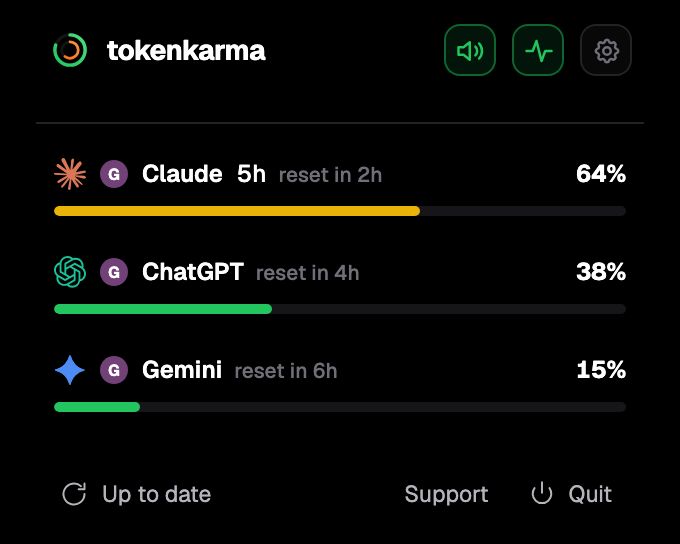
Your accounts. Your limits. Right on your desktop.
Subscription or API key: check which one you are using
Signed in with your Claude subscription, Claude Code uses your plan's limits. Signed in with an API key from the Claude Console or a cloud provider, there is no plan limit: every token is billed to that account, with no hard stop.
If an ANTHROPIC_API_KEY environment variable is set on your computer, Claude Code uses it instead of your subscription, and you pay API rates for usage your plan would have covered. Run /login inside Claude Code to switch back to your subscription.
Your Claude Code limits on your screen, with their reset times.
tokenkarma shows where you stand and when each limit resets, while you work.
Three steps: sign in, get the app for your Mac or Windows computer, then add the extension from the app.
What uses your Claude Code limit fastest
- The model: Opus costs several times more per turn than Sonnet, and Sonnet more than Haiku.
/model opusplanuses Opus to plan and Sonnet to carry out the work. - A long session: every earlier message is sent again on each turn, so a session that has read many files carries all of them every time.
/clearwhen you switch tasks is the most effective fix. - Subagents and agent teams: each one makes its own requests against your limit, and an agent team's usage grows with the number of teammates running and how long each one runs.
- Large parallel runs: one heavy burst can use up the weekly allowance before the 5-hour window resets.
How to see your Claude Code usage
In Claude Code, /usage shows your plan's usage bars, activity stats and a breakdown of what counted against your limits (skills, subagents, plugins and MCP servers). /cost and /stats open the same screen. A custom status line can show the 5-hour and weekly percentages and their reset times. In Claude, Settings > Usage shows the same limits.
tokenkarma keeps those limits on your Mac or Windows screen while you code, next to your other AI tools: the 5-hour and weekly percentages, the Fable limit when your plan has one, each reset time and the usage credits you spend. It alerts you at 75, 90 and 100 %, so you don't have to stop and type /usage. On paid tokenkarma plans you also get a heads-up before you hit a limit and an alert when a limit is back.
What happens when you hit the limit
Claude Code shows a message such as "You've hit your session limit · resets 3:45pm" or "You've hit your weekly limit", and stops sending requests until the time shown. Changing model does not help, because the session and weekly limits cover all models. Some accounts also see a separate Opus or Sonnet limit; in that case only, switching to another model family keeps you working.
- Wait: in recent versions, in an interactive session signed in with your Claude subscription, Claude Code waits and continues the task by itself once the limit resets.
- Wrap-up: if you reach the 5-hour limit in the middle of a response, Claude Code may finish the step in progress ("Usage limit reached · wrapping up"). It is small, is being released gradually, and counts toward your weekly limit.
- Usage credits (formerly extra usage): keep working at API rates, up to the monthly spend limit you set.
/usage-creditsopens the settings. - Upgrade to Max or Ultra, or use a Console account with API credits for a heavy sprint.
Usage credits are money on top of your subscription. On Expert, you can set a limit on Claude Code usage credits per session, day or week, and Claude Code stops once before you go past it.
Frequently asked questions
Does Claude Code have its own usage limit?
No. It shares your Claude plan's 5-hour and weekly limits with Claude on the web, desktop and mobile.
How do I check my Claude Code usage?
Type /usage in Claude Code. It shows your plan's usage bars and what counted against them. Settings > Usage in Claude shows the same limits.
When does the Claude Code limit reset?
The 5-hour session resets five hours after the first message of the period. The weekly limit resets at a fixed day and time assigned to your account, shown in the limit message and in Settings > Usage.
Why is my Claude Code limit used up so fast?
Opus, long sessions that resend their whole history, subagents and agent teams all use more. Switching to Sonnet for routine work and using /clear between tasks help most.
Does Claude Code use my subscription or my API key?
Your subscription, unless an ANTHROPIC_API_KEY environment variable is set, in which case Claude Code bills that API key instead. /login switches back.
What happens when I hit the Claude Code limit?
Requests stop until the reset time shown. You can wait (Claude Code can continue by itself after the reset), turn on usage credits, or upgrade.
Sources: support.claude.com/en/articles/11145838 · support.claude.com/en/articles/8325606 · support.claude.com/en/articles/11049741 · support.claude.com/en/articles/15424964 · support.claude.com/en/articles/9797557 · support.claude.com/en/articles/14552983 · support.claude.com/en/articles/11647753 · support.claude.com/en/articles/12429409 · support.claude.com/en/articles/17040437 · support.claude.com/en/articles/17728952 · code.claude.com/docs/en/costs · code.claude.com/docs/en/commands · code.claude.com/docs/en/statusline · code.claude.com/docs/en/errors · code.claude.com/docs/en/interactive-mode · claude.com/pricing. Checked on November 18, 2026.