 ChatGPT
 Gemini
 Grok
Know before you
hit the limit.
Get a heads-up as your usage approaches its limit, so you can plan your next move before you’re interrupted.
See your usage, know when your limits reset, and keep your AI spending in view.
Three steps: sign in, get the app for your Mac or Windows computer, then add the extension from the app.
Mac: Apple Silicon (M1 or later), macOS 13+. Windows 10/11.



Your setup. Your rules.
Switch what each ring tracks, whenever your work changes. Keep the right limits in sight and plan ahead, before a cap interrupts your task.

Try it. Make the rings yours.
Keep your usage and limits close, right on your desktop.
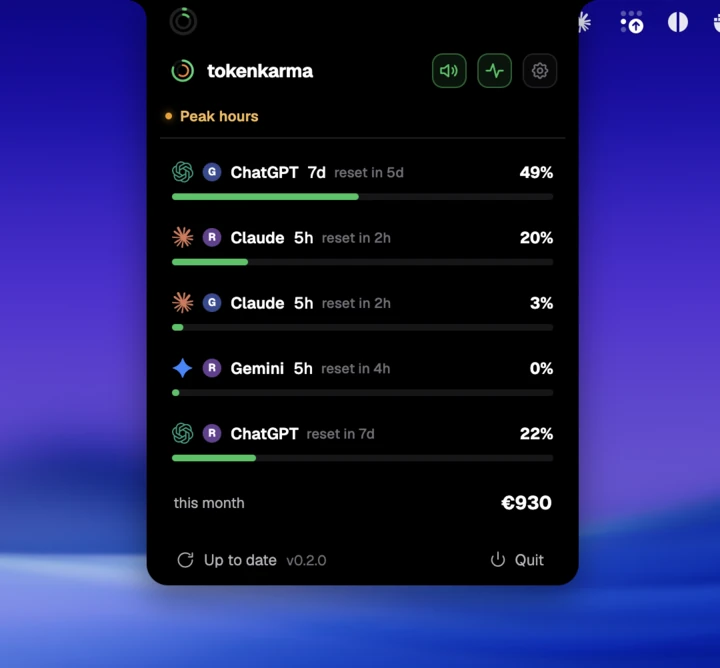
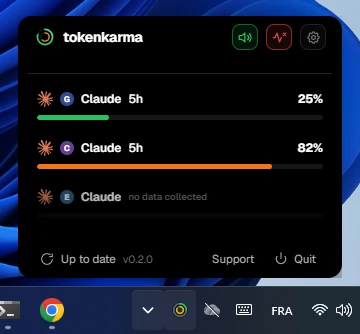
Get a heads-up as your usage approaches its limit, so you can plan your next move before you’re interrupted.
See when your limit resets. Get notified when your allowance is available again, without checking back.
Multiple accounts
Track your personal and work accounts side by side. Each keeps its own usage and limits, with a color badge to tell them apart.
Simple UI, works well. Usage visible from pin. More info when you click. Well done.
 Michael Allen
The dual ring system is super intuitive and the color coding makes it really easy to pace yourself throughout the day.
 Audrey Morin
Helpful to know Claude usage before I hit the limit !
 Cyndie LO
It's great for visualizing how much of your token you are using easy to access and available at any moment
 Cosmos De La Cruz
Very easy to use. Such an amazing extension, with real time updates, warnings and incredible UI.
 Felix Kabira Kagwi
The interface is sleek, intuitive, and provides an accurate, real-time view of my current usage limits. No more guessing when I might get cut off mid-session.
 Mahesh B
great little app. easy to use.
 Johann Fojas
Finally! Huge time saver. Thanks guys!!
 Christian Harten
very informative and design looks great
 Saurabh Kumar
Love attention to detail in the user interface design and especially the activity heat map.
 Vlad Kutepov
great
 jay
great
 Mohammed Abukwaik
Insanely good. thanks so much mate!
 Dwaipayan Pradhan
Very well made and very useful in daily life. Safe and secure.
 Nanobot
awesome, and up to date very fast
 Ernesto Díaz
love it
 Oakridge International
Great one!
 Thomas Jose
excellent to track yor claude token usage
 M.ABDULREHMAN
cool
 Ashutosh Yadav
Perfect tool, works in 1 click
 Lucas Israel
perfect
 galaksss
excellent extension
 Okeke Isaac
great extension to keep record for claude tokens
 Gadget Aires
Amazing.
 Sumit Shaw
Awesome!
 Nuno Duarte
Works as expected. Thanks
 WTF Rules
This is Great
 Rafael Gomez
Good UI
 Surapol Pairojtanachai
what can i say. Its a simple extension that does exactly what is says it does.
 Derrick Billups
Super
 Albert Antonini Mangia
Great idea!
 Johny Hudson Berica
Love it
 Leon Rud
For people who use several AI tools
Already a user? Upgrade in your account
Every AI tool and every account you use
Already a user? Upgrade in your account
Everything in Hobbyist plus
Your AI limits and when they reset
Using just one AI tool? Free tracks it with live usage. Get started
For Claude Code users
Set a spending cap for your Claude Code session, day or week.
 Claude Code
┌─ 🛡 tokenkarma ───────────────────────────────
│ 🔴 EXTRA USAGE: limits armed
│ /tokenkarma session|day|week <usd>
│
│ Session   $0.38 / $20.00
│ █░░░░░░░░░░░░░░░░░░░░░░░░░░░░░░░░░░░░░░░   2%
│ Day       no limit
│ Week      no limit
│ Extra usage this month   178.26 / 500.00 USD
│ ███████████░░░░░░░░░░░░░░░░░░░░░░░░░░░░░  36%
│
│ ⛔ 1 block today
└─ ⚡ /tokenkarma 20 · /tokenkarma menu ─────────Every seat has its own stack: subscriptions, API keys, the small tools nobody declares. Bring usage and spending together in one company view. Join the waitlist for the Team console, with invites and seat management.
 $612
 $487
 $391
 $287
 $297
 $186
 $142
 $213
 $124
 $97
 $412
 $318
 $183
Download the app for your Mac or Windows computer and sign in. In the app, click Connect browser and add the tokenkarma extension: tokenkarma needs both. Your AI tools then show their limits and when they reset.
Mac: Apple Silicon (M1 or later), macOS 13+. Windows 10/11. Intel Macs are not supported.
Yes, on Mac and Windows. In the app, click Connect browser and add the extension from there. The app connects to it by itself, with no code to copy.
See our integrations page for supported providers and available usage signals. Coverage and reset information vary by provider.
Yes. Choose the provider and usage window for each ring in settings. You can change them whenever your task changes, keeping the limits that matter to your work in view. Available usage windows depend on the provider.
Yes, with Expert. Track separate personal and work accounts from the same provider, alongside accounts from other AI providers. Each account keeps its own usage readings and badge. See the plans and pricing.
Yes. Adjust your usage thresholds and turn sound or the visual pulse on or off in the app settings. Choose how you want to be notified as your usage approaches a limit.
You choose your plan after configuration. If you choose Hobbyist or Expert, payment starts when you subscribe. There is no free trial on paid plans.
Keep your AI limits and spending close, wherever you work.
Mac: Apple Silicon (M1 or later), macOS 13+. Windows 10/11.