Your Claude plan's usage limits. In sight, before they stop you.
See how much of your Claude 5-hour and weekly usage is left on Pro, Max or Ultra, and when each one resets, on your Mac or Windows screen.
- Claude
- ChatGPT
- Grok
- Cursor
- Perplexity
- + more
Mac & Windows
Mac: Apple Silicon (M1 or later), macOS 13+. Windows 10/11.
Our tools are used by 20,000+ users.
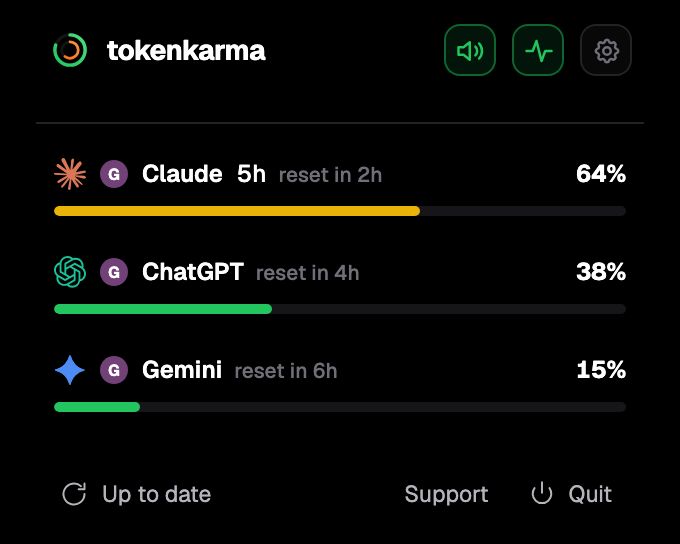
Your accounts. Your limits. Right on your desktop.
How Claude plan limits work
Every paid Claude plan has two kinds of limit: a session limit that resets every five hours (verified Ultra accounts have none), and a weekly limit that resets once a week. The session period starts when you send your first message and resets in full five hours later. The weekly limit resets at a fixed day and time assigned to your account, whatever day you started using Claude or subscribed.
Your chats in Claude on the web, desktop and mobile and your work in Claude Code all draw from the same limits.
Anthropic does not publish a message count for any plan. How fast you reach a limit depends on the model you use, how long your conversation is, the files you attach, the features you use and the effort level you pick. What Anthropic does publish is how each plan compares with Pro.
Claude limits by plan
| Plan | Every 5 hours | Every week | Fable |
|---|---|---|---|
| Free | Limited | Limited | Not included |
| Pro | 1x (the reference) | 1x | Usage credits only |
| Max | 5x Pro | 5x Pro | Up to 50 % of the weekly limit |
| Ultra | No 5-hour limit on verified accounts | 10x Pro | Up to 50 % of the weekly limit |
Pro gives at least 5x more usage per 5-hour session than Free. Max was called Max 5x, and Ultra was called Max 20x; existing Max 20x subscribers moved to Ultra automatically.
On Max and Ultra, Fable has its own weekly limit: you can spend up to half of your weekly limit on Fable, and it still counts toward the same weekly total. On Pro, Fable runs on usage credits from the start.
Ultra accounts are verified automatically, from factors like account and payment history. Until an account is verified, a temporary limit applies. In Settings > Usage, a verified Ultra account shows no Current session bar. The weekly limit always applies on Ultra.
On Team plans, limits apply per member: a Standard seat gets 1.25x Pro's per-session usage and a Premium seat 6.25x, each with a weekly limit.
Your Claude limits on your screen, with their reset times.
tokenkarma shows where you stand and when each limit resets, while you work.
Three steps: sign in, get the app for your Mac or Windows computer, then add the extension from the app.
When Claude limits reset
- The 5-hour session: five hours after the first message of the period, in full.
- The weekly limit: at the day and time assigned to your account. Settings > Usage shows your next reset time.
- Upgrading: the new plan's limits apply right away.
Anthropic also gives eligible plans an occasional free limit reset (5-hour, weekly or Fable). You use it from Settings > Usage with “Reset for free”, on the web, desktop or mobile app, not from Claude Code. It restores usage within your existing limits; your weekly limit still resets on its usual day.
What happens when you reach a limit
You can wait for the reset, upgrade your plan, or turn on usage credits (formerly called extra usage). With usage credits on, your work continues at standard API rates instead of stopping, until you reach your monthly spend limit or, with auto-reload off, your credit balance runs out. Usage credits are off until you turn them on, and you can turn them off in Settings > Usage.
Claude warns you as you approach a session or weekly limit, and the notice changes to “Now using credits” once credits take over. That spend is money on top of your subscription, so it is worth watching.
How to see your Claude usage
In Claude, Settings > Usage shows your current session, your weekly limits, their reset times and any usage credits used. tokenkarma keeps the same numbers on your Mac or Windows screen, next to your other AI tools: the 5-hour and weekly percentages, the Fable limit when your plan has one, each reset time and the usage credits you spend. It alerts you at 75, 90 and 100 %, so you don't have to open settings to check. On paid tokenkarma plans you also get a heads-up before you hit a limit and an alert when a limit is back.
Get startedFrequently asked questions
How many messages do you get with Claude Pro?
Anthropic does not publish a number. It depends on the model, the length of the conversation, attached files and the features you use. Pro gives at least 5x more usage per 5-hour session than Free.
How much more usage does Max give than Pro?
Max gives 5x Pro's usage every 5 hours and every week. Ultra gives 10x Pro's usage every week, with no 5-hour limit on verified accounts.
When does the Claude weekly limit reset?
At a fixed day and time assigned to your account, which stays the same whenever you use Claude. Settings > Usage shows the next reset.
Does Claude Code share the Pro limits?
Yes. Claude, Claude Desktop and Claude Code all count toward the same 5-hour and weekly limits.
Is Claude Ultra unlimited?
No. Verified Ultra accounts have no 5-hour limit, but the weekly limit and the Fable weekly limit still apply.
What happens when I hit my Claude limit?
You can wait for the reset, upgrade, or turn on usage credits to keep working at standard API rates.
Sources: support.claude.com/en/articles/11647753 · support.claude.com/en/articles/8325606 · support.claude.com/en/articles/11049741 · support.claude.com/en/articles/17728952 · support.claude.com/en/articles/15424964 · support.claude.com/en/articles/17007452 · support.claude.com/en/articles/12429409 · support.claude.com/en/articles/9797557 · support.claude.com/en/articles/9266767 · support.claude.com/en/articles/11145838 · claude.com/pricing. Checked on November 18, 2026.